Meeting Alerts & Invitations
Magical posts two kinds of notification. A meeting alert fires once, at a moment computed from the event’s start. An invitation banner arrives when someone invites you, and stays worth acting on until you answer it.
Both are macOS notifications, so they honour Do Not Disturb and appear in Notification Centre. The tray and the Dock badge count the same invitations without interrupting you. Invitation Tray covers those.
Meeting Reminders
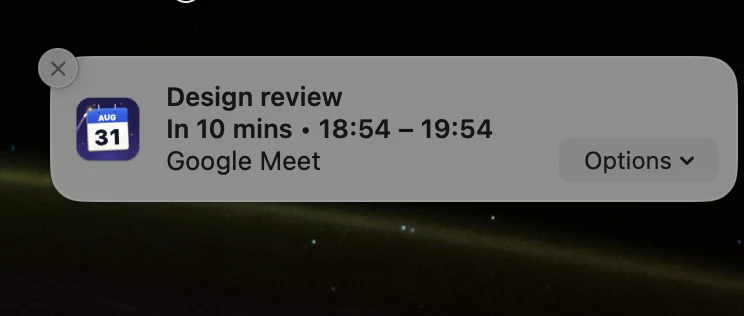
Section titled “Meeting Reminders”Ahead of a meeting, Magical posts a native notification carrying the meeting title, the start time, the attendees and the account colour:
- Join Call: appears when the event has a conference link, for Google Meet, Zoom, Microsoft Teams and Webex, and opens the meeting without bringing the Magical window forward.
- Snooze: re-arms the alert five minutes later, for when you are finishing something.
- Always open calls in the browser: a toggle in Settings → Notifications that sends conference links to your chosen browser and account profile instead of the desktop app, which is what you want when your work Zoom or Teams account is signed in to one browser session. See Settings Reference.
The start time on the banner follows your Mac’s clock, so a Mac set to 24-hour time reads 14:35 where a 12-hour one reads 2:35 pm. See the Settings Reference.
Lead Time
Section titled “Lead Time”Settings → Notifications → Alert me sets how early alerts fire: 1, 5, 10, 15 or 30 minutes before the start. See Settings Reference.
An event with its own reminder in Google Calendar overrides that setting, and the earliest of the event’s reminders is the one that fires. Google does not send a calendar’s default reminder time to Magical, so an event that takes its calendar’s default falls back to the app-wide lead time.
Alerts by Calendar
Section titled “Alerts by Calendar”Settings → Notifications → Alerts by Calendar mutes reminders per calendar; the Settings Reference has the control. A muted calendar keeps its events on your schedule and stops its banners, and its invitations stay out of the tray and the Dock badge too.
An event that sits on several calendars is silenced only when every calendar holding it is muted.
Invitation Banners
Section titled “Invitation Banners”A new invitation posts a banner carrying the meeting name, the organiser and when it is:
- Accept replies Yes to the organiser.
- Maybe replies Tentative.
- Decline replies No.
An invitation that was already waiting when Magical first read an account is not announced. The first look records the account’s pending invitations silently, so a launch does not replay a backlog of banners for invitations you have seen. What arrives afterwards is what posts.
What Answering Does
Section titled “What Answering Does”Every answer takes the same path, whether it comes from a banner, the tray or the menu bar popover:
- The reply is written to Google Calendar from inside the app, in the account’s own session, so it needs no browser tab and does not reload the view you are on.
- A reply made mid-edit waits. If an event editor is open when you answer, Magical holds the answer until the editor closes and then applies it.
- The invitation leaves the tray and the badge as the answer lands, before the next sync.
- A reply covers the next occurrence, not the series. Google asks whether an answer means this event or the whole series, and Magical answers for this event, so declining next Tuesday’s stand-up leaves the following weeks alone. Because a series counts as one invitation, it does not come back as unread each week either. Deleting a recurring event works the same way.
- Declining turns off that meeting’s reminders.
- An answer Google refuses opens the event instead of failing quietly, so you can finish it there.
An answer given in Google Calendar or on a phone reaches the tray and the badge at the next sync.
When a Banner Does Not Appear
Section titled “When a Banner Does Not Appear”- A Focus: a silenced calendar is still scheduled, and its banner is dropped at the moment it would post, so an alert armed before a Focus began stays silent through it. See Focus Filters.
- A muted calendar: see Alerts by calendar.
- Offline: alerts are armed from the copy of your calendar Magical keeps on disk, so they still arrive without a connection. A banner drawn from a copy that has stopped updating says how long ago the calendar last synced.