Invitations & Badges
Magical keeps track of every meeting invitation awaiting your reply, across every account, so answering one takes a menu rather than a Google Calendar tab, a page load and a hunt for the event chip.
The Invitation Tray is the toolbar item that lists them, and the Dock badge is the same count with the window closed. Invitations also arrive as banners, which Meeting Alerts and Invitations covers along with what an answer does to the event.
What the Tray Counts
Section titled “What the Tray Counts”An invitation is outstanding while Google reports that you have not responded, with these exceptions:
- A recurring meeting counts once. A weekly stand-up is one row, dated by its next occurrence rather than its first.
- Any reply settles the series. Answering one occurrence clears the whole series from the tray and the badge, because Google can leave the later occurrences marked as awaiting a reply.
- A finished meeting drops out. Once the last occurrence has ended, the invitation leaves on the next sync.
- A calendar you are not a guest of is not an invitation. An event on a shared calendar owes you no reply.
Accepted, tentative and declined meetings never count. The date beside each row follows your Mac’s region and clock, like every other date in Magical; see the Settings Reference.
Window Toolbar Item
Section titled “Window Toolbar Item”The tray sits in the native toolbar of the main window. Window Toolbar covers the rest of the toolbar and how to rearrange it.
- Empty tray: nothing is awaiting a reply.
- Full tray: carries a count of the invitations still awaiting one, which is the number the Dock badge shows.
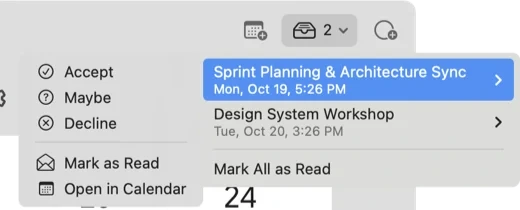
- The menu: clicking the tray lists the outstanding invitations for the account the window is showing. Hover a row for its submenu: Accept, Maybe, Decline, Mark as Read and Open in Calendar.
- Mark All as Read sits at the bottom, and appears only while something is unread. It acknowledges new arrivals without answering them, so they leave the unread count and stay in the tray.
- An invitation you have already read is dimmed.
The account switcher carries a dot per account, filled while new invitations have arrived on it and not been dealt with, and a ring otherwise.
Dock Badge
Section titled “Dock Badge”The Dock badge counts every account. It is the number you see with the window closed, so it says how much is waiting for you rather than for whichever account happens to be open, and it survives a quit and relaunch.
Settings → Appearance → Dock badge, in the Settings Reference, chooses between two readings of the same pile:
| Mode | Badges | Clears when |
|---|---|---|
| All outstanding invitations | every invitation awaiting a reply | the last one is answered |
| Unread invitations | invitations that arrived while you were away | answered, or marked read |
The second mode counts only what a banner announced, so the backlog Magical records silently on a first look at an account never enters it.
The badge caps at 99+, and answering the last invitation clears it.
Every answer given inside Magical clears the badge as it lands. An answer given in Google Calendar or on a phone reaches it at the next sync.